KSP Scrapbook
Thoughts and notes about Kerbal Space Program
More than just a simulation game, KSP is a learning platform for Rocket Science, Orbital Mechanics and other scientific and engineering disciplines associated to flight and space exploration. It works on a simplified scaled down model of around 80% of our own solar system. Concepts in KSP are also used in the real world, and more concrete definitions and explanations can be found on aerospace agencies such as NASA or ESA.
If you have a desire for more “official” sources of knowledge as an intro to Rocketry or Celestial Mechanics this is a good place to start.
Please note that all this material applies only to the latest versions of KSP. I have not installed/played KSP2 up to this date, so even though I believe most information is applicable, I cannot vouch for it.
This is the mission Flag I use.
Mods
I use exclusively the CKAN (Comprehensive Kerbal Archive Network) tool to download and install mods. It will ensure compatibility between mods and with the latest KSP versions.
Glossary
General Tips
-
The most important tool in KSP my appreciation is the maneuver node editor. Understand it correctly, and when and how to edit it for maximum manuever effectivity.
-
Although kind of unintuitive, remember that changes in speed do not make your vessel or craft transit faster at a given orbit; instead it changes the geometry of the orbit, so you may find yourself at higher or lower speeds because the orbit has a different shape.
-
Burning at orbital special points is optimal. E.g. burning prograde at your Apoapsis is the most efficient way to raise Periapsis and vice-versa. Burning in Normal or Anti-Normal direction at either the orbit’s Descending or Ascending Nodes is the most efficient way to change Orbital inclination.
-
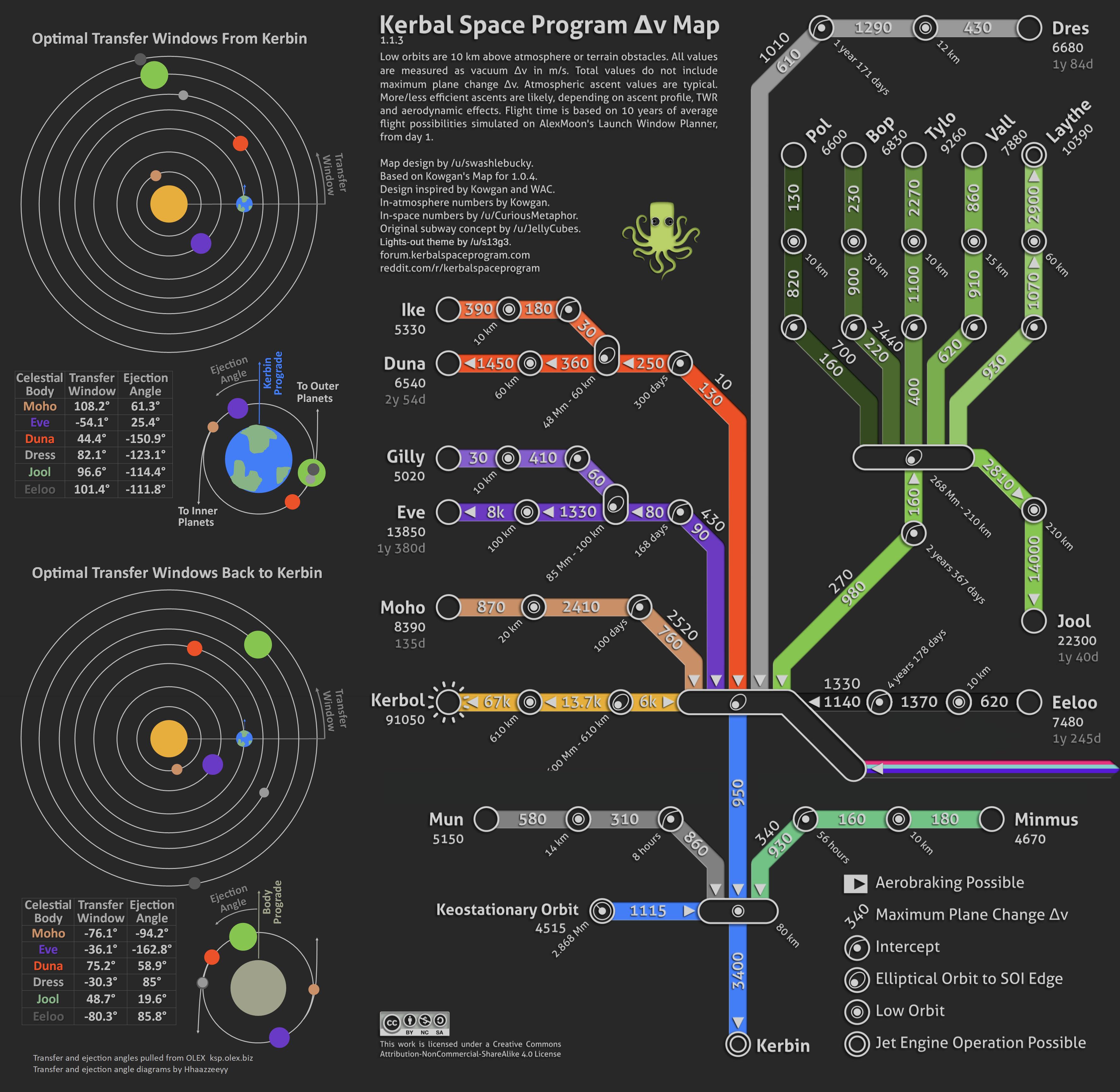
Travel to other celestial bodies requires planning and execution at precise times, because the amount of Delta-V a vessel can carry is finite. There are limits to the maximum range of your craft based on the efficiency and size of the design and how well maneuvers are executed at the right dates.
There are planning tools that allow you to determine the amount of Delta-v required for a given encounter to a celestial body at a specific orbit, so you can design a craft accordingly.
The most well known tool is the Transfer Launch Planner as part of the tools linked below. Use this to find the best dates/time for planning your missions. -
If enabling CommNet, Choosing the right type of communication device and antennas for space travel is also important, and there are tools for that. A Pilot in KSP is a role that can create/edit maneuver nodes, so if you lose communication with KSC and your vessel is not crewed by a Pilot, you may not be able to design a navigation solution with maneuver nodes, until Comms are reestablished (as in the case of traveling in the shadow of another celestial body between the craft and Kerbin).
-
Besides a Pilot, the other roles are Scientist, which allows for certain experiment resets in Science Mode, and Engineer which is capable of fixing malfunctioning equipment with toolkits.
Vessel Design
Essential Vessel Checklist before launch
-
Verify the craft has a root part (a Command Module, either a crewed capsule or an unguided telemetry part) so it can be flyable.
-
Does your Command Module have (and need) a Heat Shield? have you added the coupling parts for stage separation? have you added means for atmospheric stability (such as fins) in your lower stages?
-
Reduce weight (mass) as much as possible.
40 units of Ablator (on Heat Shield) is enough for a Kerbin Command Module reentry at 2500m/s. Maybe 3 times as much for higher speed re-entries at inclined orbit. 600 units is an overkill. Are you using single fuel engines, such as Nuclear? - then, no oxidizer is needed. Are you using RCS? if the answer is no, then no need to carry monopropellant. -
Revise the Delta-V budget for different stages ASL and in the Vacuum of space.
Your lower booster stages should be able to provide at least 3400m/s ASL to get the craft into orbit. The remaining Delta-V should be estimated with the aid of a map, including the return trip. Add some 20% to the overall budget if you’re inexperienced. -
Unless you’re an experienced Pilot, you may wish to add stability assisted control in the form of SAS to your craft for a more controlled flight.
Please note that SAS usually is provided by the addition of Reaction Wheels to your vessel’s stages - higher torques for heavier parts. Most Command Modules provide an embedded reaction wheel that is capable of handling most last stages/landers mass, but won’t be useful for heavy boosters or clustered engines. -
Check your Communication capabilities. Select and add the correct antennae for your voyage, if having CommNet enabled.
This Antennae Selector is helpful. -
If you have reaction wheels (included or not) and Antennae, its advisable to add a couple extra batteries to handle the excess electrical power drawn from these devices. Consider craft mass when adding batteries, and don’t forget to add means to recharge them, e.g. Solar Panels.
-
If your craft or parts of it will perform Docking maneuvers in Vacuum, its advisable to add RCS thrusters. They come in different sizes with low to high power respectively, from 0.1kN up to 12kN. Choose the smallest possible for the vessel, remembering to balance thrusters around the craft’s centre of mass. You may consider carrying extra monopropellant in additional tanks, besides the amount included in some Command Modules.
In addition, allow RCS to be used only for craft translation, by disabling the Roll, Pitch and Yaw control in the RCS thrusters setup (must have Adjustable Tweakables enabled in the game settings), so these movements are provided by Reaction Wheels instead - no monopropellant required. -
I suggest always rotating so the Root Part’s front face is directly opposite to the launch pad.
In other words, the whole assembly’s back is facing towards the VAB door and towards the launch pad. By selecting the Root Part and pressing Q or E on the keyboard, you can rotate the whole vessel assembly. This allows the 90º line on the Navball (East) to be facing down, allowing for key W to be used on Gravity Turn launch corrections. -
Check your staging! verify that parts are deployed correctly in expected sequence.
-
Check you have limited the thrusters ASL so the TWR for lower stages is between 1.33~1.35, to avoid excessive G-Forces.
-
Are you launching in the right Transfer Window for the celestial body you plan to encounter? Use tools such as the Launch Window Planner and warp time to reach the appropriate date and time in KSC’s Tracking Station before your launch.
-
Finally, verify your crew. Missions with separate docking parts may require more than one occupant, and ensure the role(s) is(are) appropriate for the chosen game style.
Gravity Turn Launches
Booster Library
Tools
Gratitude
Many thanks to youtubers such as Mike Aben and Matt Lowne, as well as the community at /r/kerbalacademy and /r/kerbalspaceprogram for sharing much of the knowledge compiled here.